Upload PDF
Contract PDF
30% attrition · due Aug 14
Turn signed hotel contracts into a live room-block plan. Track pickup and deadlines, collect guest names, and catch hotel rooming-list differences before they become bills.
The contract knew the deadline. The spreadsheet knew the pickup. The email thread knew what the hotel promised. None of them knew each other.
30% attrition · due Aug 14
142 of 220 room nights
“Attached is our latest list”
Rooming list due · 9 days
Who still owes guest names?
See what you agreed to, what is at risk, where each guest belongs, and whether the hotel's list matches yours.
Blocks turns rates, dates, commitments, and deadlines into the checklist your team runs.
Group agrees to pick up no fewer than eighty percent (80%) of the contracted room nights, measured cumulatively across the Block rather than night by night.
Sample contract excerpt · fictional hotel and event
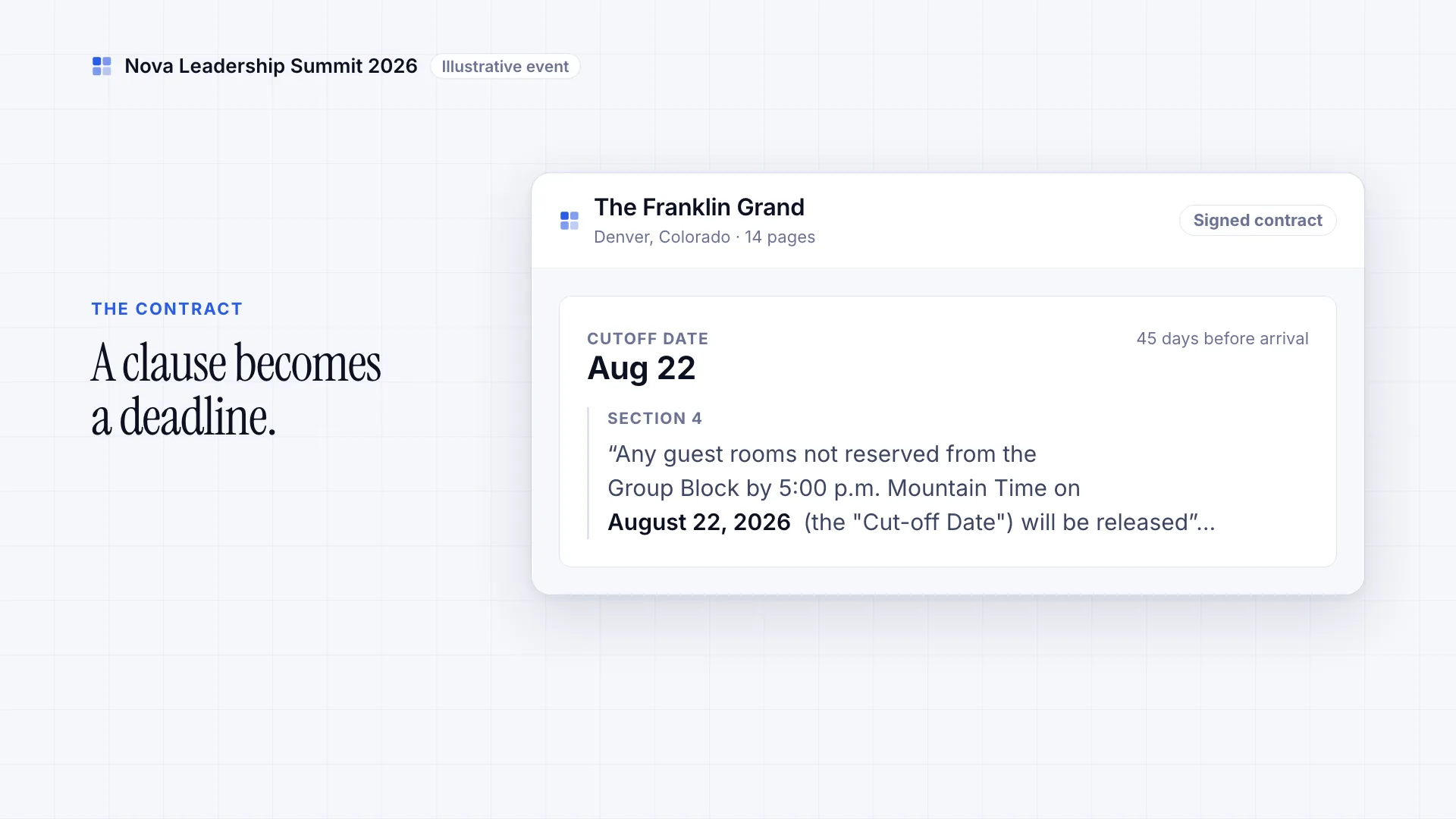
From Section 4
“Any guest rooms not reserved from the Group Block by 5:00 p.m. Mountain Time on August 22, 2026 (the "Cut-off Date") will be released”…
Quoted in the excerpt
From the contract
“Guest Room Rate: $219.00 per room, per night, single or double occupancy, exclusive of applicable taxes and fees.”
From Section 6
“A complete rooming list, on the Hotel’s standard template, is due to the Hotel no later than September 8, 2026.”
Pickup and attrition exposure stay visible by night and hotel, before penalties hit.
650 room nights are unfilled, and pickup is 426 short of the 80% attrition commitment, before the Aug 22 cutoff.
Blocks drafts a plan checked against each night's capacity. Refine it in plain English, then approve. Move a room to another hotel with its names, roommates, and travel details.
Blocks redrafts the whole plan from your instruction — and names anything it couldn’t act on, with the reason.
Blocks reads the hotel's list on its own terms — its room codes, even a scanned page — and groups the real differences for review.
Room-block costs hide in three places: attrition penalties, staff hours, and errors that surface at check-in. Blocks keeps the dollars, the deadlines, and the differences in front of you while there is still time to act.
Cutoffs and rooming-list due dates stay beside the contract terms that set them, including what missing a deadline can cost.
Learn more →See pickup, contracted cost, and attrition exposure by hotel and date, including a shortfall forecast before rooms are assigned.
Learn more →Missing names, approaching deadlines, overdue hotel replies, and department changes awaiting your approval rise to the top, so you know what to act on next.
Learn more →Review name, date, and room differences together before they reach the front desk.
Learn more →Collect names, send the hotel rooming list, track the reply, and check what comes back. Blocks keeps the round-trip in one place, and you approve every change.
Department leads submit requests and guest names through a private portal. Remind anyone outstanding in one click. Attendees can book and pay for their rooms on a branded page. Each guest can receive a personal link for contact, loyalty, and travel details.
Up to five guests per room, within the room type's limit. Travel details stay with each person.
The hotel gets a private page to view and download the rooming list in the format it needs. You see when it was first opened.
See what you sent, what you are waiting on, and what came back. A quiet hotel surfaces as overdue with a follow-up ready to send — it goes out on your click, and nothing clears itself.
Start with the list the hotel emails back, including scanned pages and the hotel's room codes. Blocks groups the differences for review. You approve every reservation change.
What the check actually looks like
The hotel sent its list back. Blocks lined it up against what you sent and found the one row that changed.

Our record: Marcus Chen, 6–9 October 2026. The hotel's list: 7–9 October 2026. Same confirmation number, one night short.
You decide what happens next: ignore it, correct our record to match the hotel, or flag it so the hotel confirms. Nothing changes a reservation until you choose.
Every hotel you have worked with, and everyone you have hosted — contacts, contracts, history — there for whoever picks the event up next.
Keep the hotel relationship when the coordinator changes. Your directory keeps hotel contacts, past events, and contracts together, and fills in the contact when you add a hotel to a new event.
Search by name or email to see a guest’s past events, hotels, room blocks, travel for each stay, and loyalty details. The next list starts from what you already know instead of from a blank row.
Bring the files you already trust, give each collaborator the right view, and keep people—not software—in charge of every proposed change.
Upload hotel contracts and import your current spreadsheets, or reuse last year's list: its dates shift to the new event and every team opens with the rooms it had. Blocks structures the terms, room nights, and deadlines.
Department leads, hotels, and guests can use their private links without creating an account. Leads submit guest names, hotels receive and return the rooming list, and each guest fills in their own details.
Ask Blocks from the web or Slack, review the proposed next step, and approve every change before it reaches a reservation.
Share a current view of spend and room nights, then export clean CSV or Excel data for the finance workflow you already run.
Whether you manage two complicated blocks a year or two hundred events, Blocks fits how you already work.
Concurrent shows and festival crews across dozens of hotels — every contract, cutoff and rooming list in one view.
Learn moreThe same hotels and the same lists every season. Clone last season's event and carry its rates and contacts forward.
Learn moreDozens of departments submitting names against one attrition threshold, with spend finance can see as it moves.
Learn moreCrew and cast across location shoots, where a unit move rewrites the housing plan — Blocks moves the rooms with it.
Learn moreHow Blocks fits into your hotel room block operation — and where your team stays in control.
Have more questions? Check our glossary of terms or get in touch.
Have your AI assistant explain what Blocks does and whether it fits the way you manage room blocks.
See how your team can track deadlines, place guests, and check the hotel’s list in one live plan.